
Have you already wrote a blog post and publish it? If not, hold on there and read this post first.
I am not going to talk about Search Engine Optimization (often abbreviated as SEO) today because I think it is still early for this blog to start a topic about SEO.
However, if I don’t warn you about your post URL here, you might end up reversing back to your old post and start working on the changes.
What is the big deal about blog post URL?
In order to give you post an SEO advantage over the URL part, you need to ensure that your URL meaningful and readable.By default, WordPress will set the URL of every blog post to:
E.g.: http://www.bloggingfever.com/?p=199

This is not a good practice because the URL of your post is not readable and the ‘?p=199’ does not resemble any meaning.
As a result, there is no SEO advantage for your blog post URL here and I would recommend you to do some changes before it is too late.
How to make your URL SEO friendly in WordPress
In order to make your URL SEO friendly, you need to include a meaningful phrase into your URL where in most situation, people will use the post name.
There is some consideration here though where it is not encouraged to have your entire post in the URL without space.
As the web URL does not allow you to have space, use symbols such as dash or underscore to separate your words.
To setup a SEO friendly URL in WordPress, it can’t be any more easier by just a few clicks on your dashboard.
- Go to Settings -> Permalinks.
- Choose the Post name selection instead of the default one.
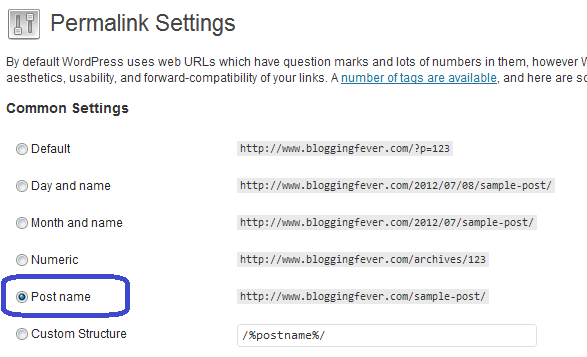
- Save your configuration once you are done with it.
You will realize that all your blog post URL ends with your post name now.
If you still have not started your blog, you still have time to change the way you format your post URL.
However, if you already have a bunch of published article, it is your call whether to make a switch or not.
And finally, if you have the time to do all the changes, I can recommend you to use the Broken Link Checker once you make all the changes to ensure that your internal links points to the correct content.
The post that you are currently reading is one of the WordPress Blog Setup series.






Leave a Reply